
System Info Tool
The System Info Tool is a simple file that gathers key details about your computer (such as serial number, RAM, storage, and operating system) and saves them to a text file on your Desktop. It does not access personal files, passwords, or browsing data.
This information is to assist with inventory documentation and future support and troubleshooting.
What the Tool Collects
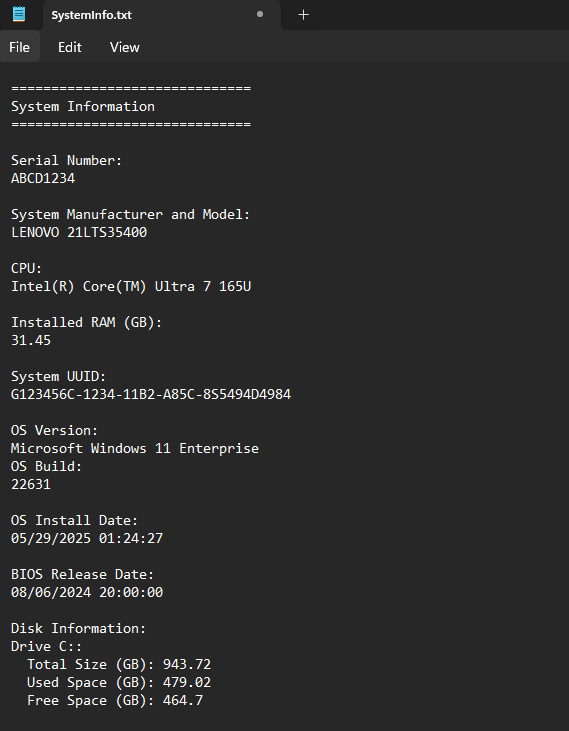
When run, the tool gathers: Serial Number, Manufacturer and Model, Processor (CPU), Installed Memory (RAM), System UUID, Operating System and Build Number, OS Install Date, BIOS Release Date, Disk Information (size, used space, free space)
How to Use the Tool
Step 1: Download the File
- Click the link below to download the file
Step 2: Run the File
- Open the file from your browser downloads notification, or
-
Navigate to the downloads folder and double-click the
Get-SystemInfo.batfile(No installation required)

If prompted by Windows, click “More info” → “Run anyway”
Step 3: Wait for It to Complete
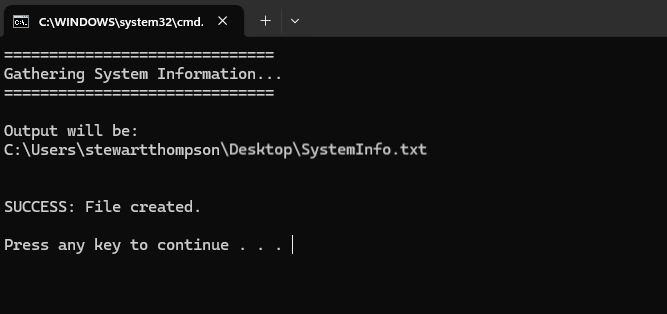
- A black command window will appear briefly
-
The tool will gather system information (typically takes a few seconds)
Step 4: View the Results
- A file named
SystemInfo.txtwill automatically open -
It is also saved to your Desktop
Step 5: Send the File
- Attach the
SystemInfo.txtfile to your email reply